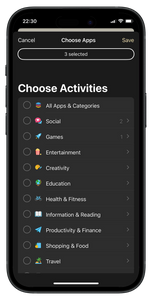
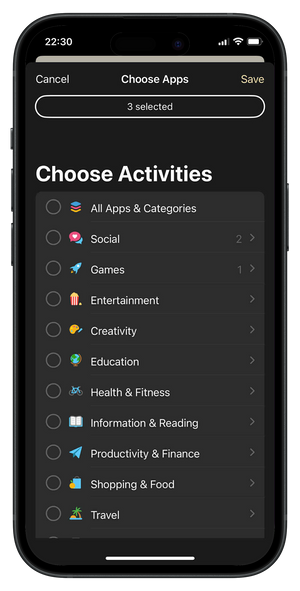
1. Choisissez les applications à bloquer
Choisissez les applications qui vous font perdre votre temps (TikTok, Instagram, Facebook, etc.).


89,95 zł
Show other people where you stand on scrolling and phone addiction.
This shallow-fit baseball cap features the embroidered slogan “Scrolling Kills the Vibe” alongside the Scrolly logo. The striped fabric is finished with navy embroidery for a clean, bold contrast. Lightweight, adjustable, and made for everyday wear.
Stop Scrolling. Start Living.
Choisissez les applications qui vous font perdre votre temps (TikTok, Instagram, Facebook, etc.).
Touchez l’animation Scrolly à l’écran, puis approchez physiquement votre Scrolly de votre téléphone.

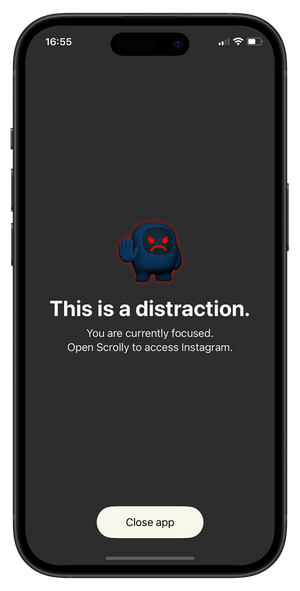
Tant que vous ne touchez pas à nouveau votre Scrolly, il est impossible d’accéder aux applications bloquées.
Ouvrez l’application Scrolly et sélectionnez les applications qui vous font perdre du temps (TikTok, Instagram, Facebook, etc.).
Approchez physiquement votre Scrolly de votre téléphone pour activer le mode Focus — toutes les applications distrayantes seront bloquées.

Éloignez votre Scrolly et profitez pleinement du moment, en restant présent et concentré. Tant que vous ne touchez pas à nouveau votre Scrolly, il est impossible d’accéder aux applications distrayantes.